woladi
🔒 Privacy Tiers for Document AI — Three Pipeline Configurations
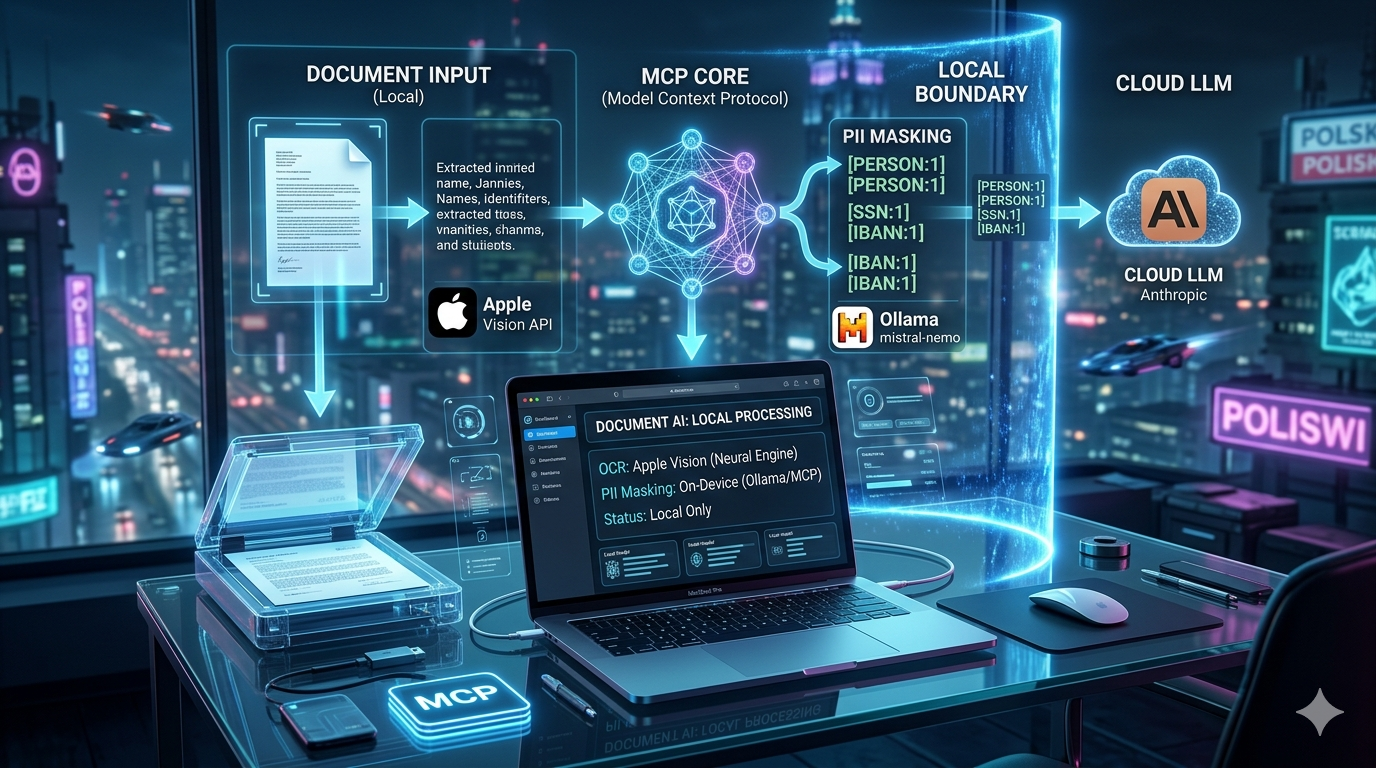
One OCR engine. Three trust models. A practical guide to choosing how much of your document processing stays on your machine.
The Core Insight
Most document AI tools work like this:
📄 Your file → ☁️ Cloud API → 🤖 LLM
Your raw file — image, PDF, scan — travels to a third-party server before any processing happens. You’re trusting the provider’s infrastructure, their logging policy, and every hop in between.
macos-vision-mcp changes the boundary:
📄 Your file → 🍎 Apple Vision (local) → 📝 Extracted text → [your choice what happens next]
The file never leaves your Mac. What you decide to do with the extracted text is where your three options diverge — and where the privacy trade-offs actually live.
The Three Pipelines
Pipeline 1 — Fully Local
📄 File
  │
  ▼
🍎 macos-vision-mcp
   Apple Vision OCR
   (on-device, Neural Engine)
  │
  ▼
🦙 Local LLM (Ollama)
   mistral-nemo / llama3 / etc.
  │
  ▼
✅ Result — nothing left the machine
How it works: macos-vision-mcp extracts text locally via Apple Vision. The extracted text is passed directly to a local Ollama model for formatting, summarising, or answering questions. No network requests are made at any stage.
Privacy guarantee: Absolute, within your local system. No file content, no extracted text, no metadata touches any external server. The only thing that leaves the process boundary is the final response rendered in your terminal or Claude Desktop interface.
Performance reality: The macos-vision vs Tesseract benchmark ran exactly this configuration — Apple Vision OCR feeding mistral-nemo on Ollama as the downstream formatter. Mean latency was 25.3 seconds per page, with ~95% of that time spent in Ollama, not in OCR. Apple Vision’s native API access is essentially zero-overhead from Node.js; the bottleneck is the local model, not the extraction step.
When to use this:
- Highly sensitive documents: medical records, legal correspondence, financial statements
- Air-gapped or compliance-constrained environments
- Batch processing where latency per file is acceptable
- Any context where you cannot accept data leaving the machine under any circumstances
The honest trade-off: Local models are weaker than frontier cloud models. mistral-nemo handles formatting and simple extraction well; it will struggle with nuanced reasoning, multi-document synthesis, or anything that requires the kind of world-knowledge that large frontier models carry. If your task requires Claude-level reasoning, Pipeline 1 is not the right fit — unless you can run a large enough local model.
Pipeline 2 — Local OCR, Cloud Reasoning
📄 File
  │
  ▼
🍎 macos-vision-mcp
   Apple Vision OCR
   (on-device, Neural Engine)
  │
  ▼
☁️ Cloud LLM
   (Claude / GPT-4 / Gemini)
  │
  ▼
✅ Result — file stayed local, text went to cloud
How it works: OCR runs locally. The extracted plain-text representation of the document is sent to a cloud LLM for reasoning, summarisation, or Q&A. The original file — pixels, layout, fonts, embedded metadata — never leaves the machine.
Privacy guarantee: Partial but meaningful. This is a significant improvement over uploading the file directly:
- A scanned PDF contains more than words. It contains page layout, fonts, stamps, potential handwritten annotations, embedded ICC profiles, document structure metadata, and in some cases digital signatures. None of this reaches the cloud.
- The cloud LLM receives a plain-text extraction — closer to what you’d paste into a chat box yourself, but automated.
However, the extracted text still contains all PII in cleartext. Names, account numbers, diagnoses, addresses — whatever Apple Vision read off the page arrives at the cloud provider verbatim. If the document is sensitive, the cloud provider’s logging and retention policies matter.
When to use this:
- Documents where the raw file format carries sensitive metadata but the text content is less sensitive
- Workflows where you need frontier-model reasoning quality but can accept that the textual content reaches a provider
- A pragmatic middle ground when full local processing is too slow for your use case
The honest trade-off: The privacy win here is real but often overstated. If a document contains a Social Security Number, that SSN will appear in the text sent to the cloud just as clearly as it appeared in the original PDF. The file format is protected; the information is not. Use this pipeline when you care about the raw file not leaving your machine, not when you need to prevent the content from reaching a provider.
Pipeline 3 — Local OCR + Pseudonymisation, Cloud Reasoning
📄 File
  │
  ▼
🍎 macos-vision-mcp
   Apple Vision OCR
   (on-device, Neural Engine)
  │
  ▼
🕵️ pseudonym-mcp
   PII → reversible tokens
   [PERSON:1], [SSN:1], [CREDIT_CARD:1]...
   (on-device, Regex + optional Ollama NER)
  │
  ▼
☁️ Cloud LLM
   sees tokens, not real values
  │
  ▼
🔓 pseudonym-mcp
   unmask_text()
   tokens → original values
  │
  ▼
✅ Result with real names restored
How it works: OCR runs locally. The extracted text is passed through pseudonym-mcp before any cloud call — structured PII (SSNs, card numbers, IBANs, email addresses, phone numbers) is replaced by deterministic tokens via regex; names and organisations are masked via a local Ollama NER model if available. The cloud LLM reasons over a pseudonymised document. The response is unmasked locally before being shown to you.
This is the pipeline described in the Obsidian Vault guide and the OpenClaw messaging guide.
Privacy guarantee: The strongest available when using a cloud LLM. The cloud provider receives a document where identifiable values have been replaced with opaque tokens. It can reason about structure, obligations, dates, patterns, and relationships — but it does not see the real names or numbers involved.
What each layer protects:
| Layer | What stays local |
|---|---|
macos-vision-mcp |
Raw file: pixels, layout, fonts, metadata, embedded artifacts |
pseudonym-mcp |
PII values: names, SSNs, card numbers, IBAN, PESEL, email, phone |
| Cloud LLM | Receives: pseudonymised text, structural context, document meaning |
When to use this:
- Documents with high PII density: contracts, medical records, bank statements, HR files
- Any workflow where you need frontier-model reasoning but want to minimise what cleartext personal data reaches the provider
- GDPR / HIPAA adjacent contexts where demonstrating reduced PII transmission is meaningful
Side-by-Side Comparison
| Pipeline 1 | Pipeline 2 | Pipeline 3 | |
|---|---|---|---|
| Raw file reaches cloud | ❌ Never | ❌ Never | ❌ Never |
| Extracted text reaches cloud | ❌ Never | ✅ Yes (cleartext) | ⚠️ Yes (pseudonymised) |
| PII values reach cloud | ❌ Never | ✅ Yes | ❌ Masked |
| LLM reasoning quality | ⚠️ Local model | ✅ Frontier | ✅ Frontier |
| Latency | ~25 s/page | Fast | Fast + small local overhead |
| External dependencies | Ollama only | Cloud API key | Cloud API key + optional Ollama |
| Best for | Maximum privacy | Metadata protection | PII protection + cloud quality |
The Boundary That All Three Share
Regardless of which pipeline you use, macos-vision-mcp enforces one guarantee that no cloud-upload approach can match: the raw document never leaves your machine.
This matters more than it might seem. A scanned medical report is not just its text. It is a TIFF-embedded image, a page geometry, a document structure, potentially a watermark or stamp, and whatever metadata the scanner attached. Sending that to a cloud OCR API hands over the full artifact. Apple Vision reads it on your Neural Engine and returns a structured text representation. That’s the extraction boundary — and it’s a hard one.
What you choose to do with the extracted text is a separate decision, with separate trade-offs. The three pipelines above are the principal configurations. Most real workflows fall into one of them, or combine them: local LLM for initial triage, cloud LLM for the final reasoning step, with pseudonymisation in between.
⚠️ The OCR Quality Caveat
There is a non-obvious interaction between OCR quality and privacy that is worth naming explicitly.
The macos-vision vs Tesseract benchmark showed that Apple Vision has a bimodal error distribution on a 50-PDF academic corpus: excellent on clean body text (16/50 files with CER < 5%), but with a brittle tail on stylized display typography (13/50 files with CER > 50%). When OCR fails catastrophically on a page, names and numbers are misread as gibberish.
This affects Pipeline 3 in a specific way: pseudonym-mcp can only mask values it recognises. If Kowalski becomes Kowaloki in the OCR output, the NER model will not flag it as a person name and it will not be tokenised before reaching the cloud. OCR errors create gaps in the pseudonymisation layer that are invisible to the user.
Practical implication: For Pipeline 3 on documents with unusual fonts, handwriting, or stylized layouts, verify OCR quality before treating the pseudonymisation pass as reliable. The benchmark’s latency data is also relevant here: at 25.3 s/page mean, it is feasible to include a local review step for high-stakes documents without making the workflow prohibitively slow.
Quick Setup Reference
# Add both MCP servers to Claude Code
claude mcp add macos-vision-mcp -- npx -y macos-vision-mcp
claude mcp add pseudonym-mcp -- npx -y pseudonym-mcp --engines hybrid

# For Pipeline 1 / Pipeline 3 NER: pull a local model
ollama pull mistral-nemo   # formatter
ollama pull llama3         # NER for pseudonym-mcp
For Claude Desktop, add to ~/Library/Application Support/Claude/claude_desktop_config.json:
{
  "mcpServers": {
    "macos-vision-mcp": {
      "command": "npx",
      "args": ["-y", "macos-vision-mcp"]
    },
    "pseudonym-mcp": {
      "command": "npx",
      "args": ["-y", "pseudonym-mcp", "--engines", "hybrid"]
    }
  }
}
🔗 Related
- 📸 macos-vision-mcp — GitHub
- 🕵️ pseudonym-mcp — npm · GitHub
- 📊 macos-vision vs Tesseract benchmark — OCR quality data behind the latency and accuracy claims in this article
- 🧠 Obsidian Vault privacy pipeline — Pipeline 3 applied to a local knowledge base
- 📱 OpenClaw messaging pipeline — Pipeline 3 applied to WhatsApp, Telegram, and Slack
- 📄 License: MIT — Adrian Wolczuk